Status Notifier | The Busy Light for Teams, Zoom, Slack & Discord
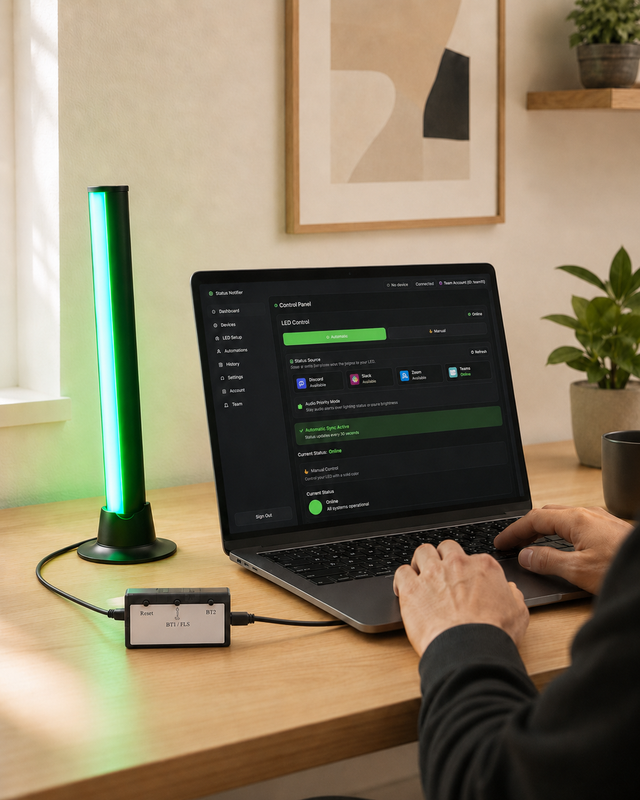
A USB desk light that turns red when you're on a call and green when you're free — automatically.
$39.99 one-time, for the lightThe free app syncs the light automatically with Microsoft Teams, Slack or Zoom. Discord starts at $4.99/month. Multiple connected platforms require Professional or Team, starting at $9.99/month.
Buy now — $39.99 →USB · Windows 10/11 & macOS 13+ · Ships from San Jose, CA · 14-day returns · 1-year warranty
What is Status Notifier?
Status Notifier is a USB-powered RGB busy light that sits on your desk and shows the people around you when you're on a call — automatically. Instead of a static "do not disturb" sign, it reads your live availability from the app you work in — Microsoft Teams, Zoom, Slack or Discord — and changes color when your status changes: red when you're busy or in a meeting, green when you're free. There's no app to babysit and nothing to configure. You plug it in, sign in once, and it just works.
How it works
A small desktop app runs quietly in the background and watches your real status in the apps you already use. When you join a meeting, switch to Do Not Disturb, or start a call, the app sends a new color to the light over USB. The light glows red for busy and green for available, and you can pick your own colors for each status. Because it connects with a simple USB cable, there's nothing to charge, pair, or reconnect — the light is ready whenever your computer is on.
Supported platforms
Status Notifier syncs with Microsoft Teams, Zoom and Slack — and it's the only commercial busy light that also tracks your Discord status, which makes it a natural fit for gamers, streamers and remote teams that live in Discord. On Professional and Team plans you can connect all four to one account and switch which one drives the light in a single click.
Want the detail on the Discord side? Here's how the Discord busy light works and what it catches today.
Focused on one app? See how it works as a Microsoft Teams busy light or a Zoom busy light. Setup guides, FAQ and support live on the Status Notifier help hub.
One light for Teams, Zoom, Slack and Discord.
Buy now — $39.99 →Also a status light for your AI coding agents
Status Notifier now follows Claude Code, Codex, Cursor, GitHub Copilot CLI and other coding agents, so you can step away while they work. The light tells you when an agent needs you or fails, and it can also show when the agent is working or done.
Give part of the light to your agents and keep your Teams status on the rest. Everything stays on your computer, and the free app follows 3 agent sessions at once. See how the AI agent light works →
Who it is for
Status Notifier is built for anyone who shares a space and can't afford to be interrupted mid-sentence:
- Remote and hybrid workers on back-to-back video calls
- Parents and partners working from a home office
- Open-plan and shared-desk office teams
- Customer support, sales, and call-center reps
- Streamers and content creators recording live
- Developers who run AI coding agents and want to know when one needs them
If your family, roommates, or coworkers keep walking in during meetings, Status Notifier gives them a clear, at-a-glance signal to wait.
Benefits
Fewer interrupted calls and fewer awkward "sorry, I was on a meeting" moments. No more manually flipping a sign or updating a status you'll forget to change back. A tidy, single-cable setup that works the second your computer boots. One light for every platform you use instead of a drawer full of single-purpose gadgets. And at $39.99, the hardware costs a fraction of enterprise busy lights while covering more apps than most of them.
Curious how it stacks up? See how Status Notifier compares to Luxafor and Busylight.
Windows and Mac compatibility
Status Notifier runs on Windows 10 and 11 and on macOS 13 (Ventura) or later, natively on both Apple Silicon and Intel Macs. Get the app from the Microsoft Store, the Mac App Store, or as a direct download. Updates install automatically, so you're always on the latest version.
What's free and what's paid
$39.99 buys the light outright — yours to keep, with no ongoing cost to own it. The app is free, and for most people using one work app, free is all you need.
Free app
$0 · no account upgrade needed- Automatic sync with one platform: Microsoft Teams, Slack or Zoom
- Checks your status every 30 seconds
- Manual control: set any color, any time
- AI coding agents: follows 3 sessions at once
- Windows and Mac
Paid plans
from $4.99/month · cancel anytime- Discord status sync (from Starter)
- Checks as often as every 5 seconds, with longer intervals when your status is steady or you're idle
- Animated effects — pulse, breathe, rainbow and more
- Several platforms on one account, switch in a click (Professional & Team, from $9.99)
- Automation rules and longer status history
- AI coding agents: 10 sessions at once on Starter, unlimited on Professional & Team
Starter $4.99 · Professional $9.99 · Team from $39.99 — per month
Designed in California; assembled in the USA from globally sourced components. Ships from San Jose via USPS Ground Advantage, US destinations only for now.
Your privacy
Your status stays yours. Status Notifier only reads the one signal it needs to pick a color — busy or free — and uses it to drive the light on your desk. It doesn't read your messages, record your calls, or sell your data. Sign-in uses each platform's official, secure login, and you can disconnect any platform at any time. AI agent status never leaves your computer: the app never stores, logs or sends your prompts or code.
Frequently asked questions
Is the app free, or is there a subscription?
Both. The app is free and, on its own, automatically syncs the light with one platform — Microsoft Teams, Slack or Zoom — checking your status every 30 seconds. Paid plans add Discord, animated effects and more frequent status checks. Discord starts at $4.99/month. Multiple connected platforms require Professional or Team, starting at $9.99/month. The $39.99 light is a one-time purchase either way.
Do I need special IT permissions to use it?
Usually not. Status Notifier installs like any normal app and you sign in with your own account. Some companies configure Microsoft 365 so an IT admin must approve any new app before its first use. If yours does, the app shows you a one-click approval link to send to your admin.
Does it need batteries or Bluetooth?
No. It's powered and controlled over a single USB cable, so there's nothing to charge or pair.
Can I use more than one platform?
Yes, on Professional and Team plans: connect Teams, Zoom, Slack and Discord to one account and switch which one the light follows in a single click. The free app and the Starter plan sync one platform.
Does it work with AI coding agents like Claude Code?
Yes. Status Notifier 2.0 shows when Claude Code, Codex, Cursor, GitHub Copilot CLI, Gemini CLI or Antigravity CLI needs you or fails, and, if you choose, when it's working or done. The free app follows 3 agent sessions at once. Everything stays on your computer. Learn more.
Will it work with my Mac?
Yes. There are native apps for Windows 10/11 and for macOS 13 (Ventura) or later, on both Apple Silicon and Intel Macs.
What if I change my mind?
See our Returns & Refunds policy for full details on timelines and how to start a return.
Stop getting interrupted
Let your desk speak for you. Plug in Status Notifier and your Teams, Zoom, Slack or Discord status shows up as a light everyone can see.
Buy now — $39.99 → USB · Windows & Mac · Free app syncs Teams, Slack or ZoomPrices in USD. Teams, Zoom, Slack, Discord, Claude, Codex, Cursor, GitHub Copilot, Gemini and Antigravity are trademarks of their respective owners. Status Notifier is not affiliated with or endorsed by Microsoft, Zoom, Slack, Discord, Anthropic, OpenAI, Anysphere, GitHub or Google.